Skip to content

For filmmakers and content creators

Footage in.
Organized library out.

Overcrank copies your cards with every file verified, keeps drives in sync on a schedule, tells you exactly what a clip is, and files it all where you'd put it yourself. Described in plain English, done in seconds, undo if you change your mind.

Free for transfers, sync and inspection. 14-day trial of the AI. macOS 13 Ventura or later · Apple Silicon and Intel.

Card → verified copy → organized by shoot date. The loop you'll run every shoot day.

What's in the box

Four tools, one workflow: copy, keep in sync, inspect, organize.

Named after engine parts because that's what they are: the pieces that keep a shoot moving.

Verified transfers

Free

Drivetrain

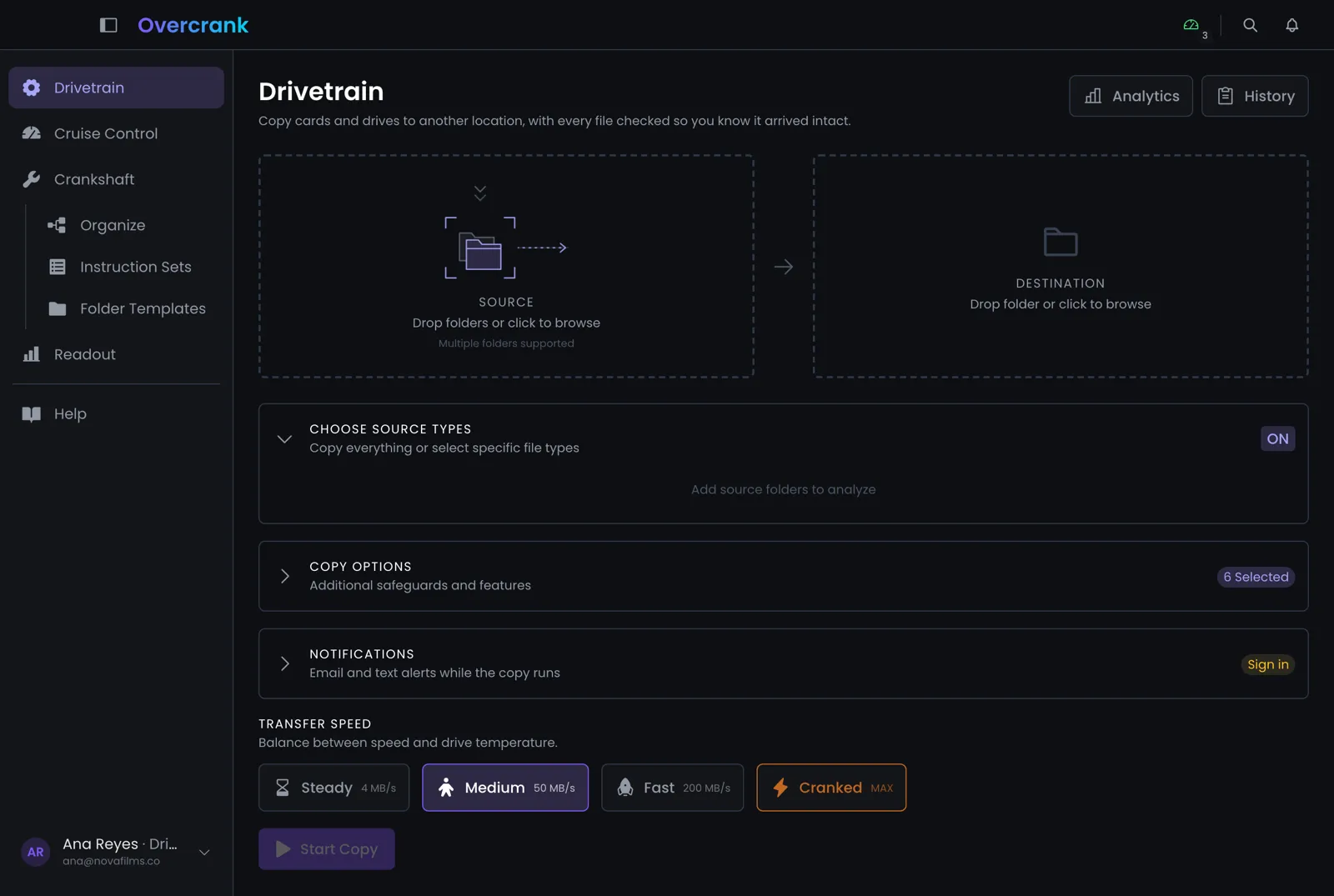
Copy cards and drives with high precision. Every file is checksummed, transfers pause and resume, and you pick a speed that keeps drives cool.

  • MD5 verification on every file
  • Pause, resume, cancel without losing progress
  • Four speed presets, drive-safe to cranked
  • Searchable transfer history
How Drivetrain works

AI organization

Driver · Crew

Crankshaft

Tell it what you want in plain English: "move the .mov files into a Videos folder, name them by shoot date." See the before and after. Apply. Undo if you change your mind.

  • Natural-language instructions
  • Before/after preview before anything moves
  • One-click undo
  • Files go to the Trash, never deleted outright
How Crankshaft works

Scheduled sync

Free

Cruise Control

Point it at a folder and a destination. It copies only what changed, on a schedule you set, and never deletes anything at the destination.

  • Delta-only incremental copies
  • Runs every minute, hour, or whenever you say
  • Never deletes on the destination
  • Activity log per job
How Cruise Control works

Media inspection

Free

Readout

Drop any clip to see what it really is: codec, resolution, frame rate, audio layout, timecode. No more guessing from the file name.

  • Video: resolution, fps, codec, duration
  • Audio: sample rate, channels, bit depth
  • File details and paths
  • Nothing extra to install
How Readout works

How it works

A shoot day, start to finish.

  1. 01verify: MD5

    Offload with Drivetrain

    Drop a card and a destination. Pick a speed. Every file is copied and checksummed; pause whenever a drive gets warm.

  2. 02preview → apply

    Tell Crankshaft what you want

    “Sort by shoot date, b-roll in its own folder, rename with the camera.” Review the before/after. Apply. Undo is one click away.

  3. 03every 15 min

    Let Cruise Control keep it that way

    A scheduled job mirrors new and changed files to your NAS or archive. Nothing is ever deleted at the destination.

Pricing

Free to copy. Cheap to think.

The transfer tools are free, forever. Pay a little for the AI, or bring your own API key and pay nothing extra for it.

Free

$0

The transfer and inspection tools, free forever.

  • Drivetrain verified transfers
  • Cruise Control scheduled sync
  • Readout media inspection
  • 1 member · 2 Macs
Download
Most popular

Driver

$8/monthor $80/yr

For one filmmaker who wants the AI.

  • Everything in Free
  • Crankshaft AI organization
  • Cranky assistant
  • Email and SMS notifications
  • 500 AI credits a month, or use your own API key
  • 1 member · 2 Macs
Start free trial

Crew

$25/monthor $250/yr

For a small team sharing a library.

  • Everything in Driver
  • 5 members · 10 Macs, pooled
  • 2,000 AI credits a month, or your own key
  • Per-member credit caps
  • Team usage dashboard
Start free trial

Every new account starts with 14 days of everything, no card required. Prices in USD. Credits: 1 credit ≈ 1¢ of AI usage; a Crankshaft instruction is usually 1–2 credits. How credits work →

Download

Get Overcrank for Mac

One download, nothing else to install. Sign in with your Overcrank account to turn on the AI tools, or just start copying.

macOS 13 Ventura or later · Apple Silicon and Intel. Notarized by Apple. Updates install themselves.

This download is for Macs with Apple silicon (M1 or later). Older Mac with an Intel chip? Get the Intel version.

Windows isn't available yet. Tell us if you need it.

The Overcrank app in dark mode showing the Drivetrain transfer screen

Questions

Good to know.

More in Help, or email support@overcrank.ai.

Is it really free?

Yes. Drivetrain, Cruise Control and Readout are free with no time limit. The AI features (Crankshaft and Cranky) need Driver or Crew. Every new account starts with a 14-day trial of everything.

What are credits?

AI features use credits; one credit is a cent of AI usage. A typical Crankshaft instruction costs one or two credits. Driver includes 500 a month, Crew 2,000, and you can buy more. If you already have a Gemini, Claude or OpenAI key, add it in your account and AI runs on your key with no credits used.

Does Overcrank upload my footage?

No. Transfers, syncs and inspection happen entirely on your Mac. For AI organization, only file and folder names (never the media itself) are sent to the model so it can plan the changes.

Can it delete my files?

Crankshaft moves anything it removes to the macOS Trash and every operation has Undo. Cruise Control never deletes at the destination. Drivetrain copies; it does not remove from the source.

What Macs does it support?

macOS 13 Ventura or later, Apple Silicon and Intel. Everything the app needs is built in, so there is nothing else to install.

Windows?

Not yet. Overcrank is Mac-first. If Windows matters to you, tell us at support@overcrank.ai.

Your privacy choices

Our site and account portal use only the cookies they need to work, like keeping you signed in. We don’t use analytics or advertising cookies today. If we ever add them, they stay off unless you turn them on here. Privacy policy